

Inside the Team: how five agents triage our support inbox
Five agents triage our support inbox: they read every email, match solved problems, find root causes and propose fixes. People decide money, promises and code.
Delivering world-class customer support is the lifeblood of any business, yet providing prompt, relevant answers without constantly pulling in senior engineers remains a major challenge.
To address this at Nebula, we built an AI-native customer support system powered by a coordinated team of agents that manages our support inbox. These agents handle end-to-end triage: reading incoming emails, pulling customer account details, identifying previously solved issues, examining server logs, and suggesting code fixes. The agent team autonomously resolves inquiries it can answer with high confidence, while seamlessly escalating complex cases to our support staff.
Read on for a breakdown of our agent team, a step-by-step trace of how an email moves through the pipeline, each agent’s core function, and practical advice on constructing your own setup.
Our Agent Team Structure
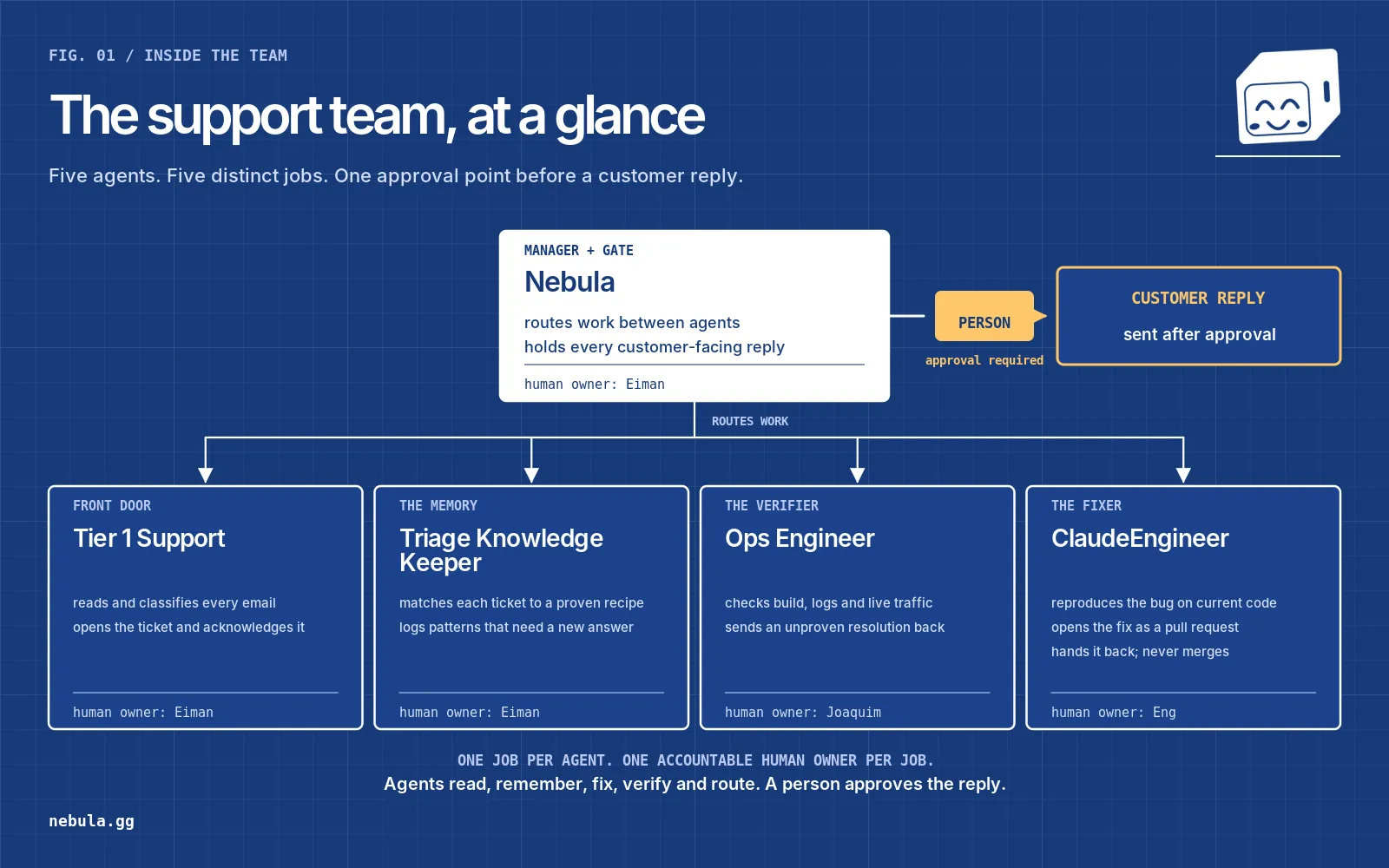
Every agent operates with specific instructions, dedicated tools, and designated human oversight. By design, no single agent handles the entire workflow independently.
- Nebula (Orchestrator): Routes emails to the appropriate agent at each stage to keep the workflow moving.
- Tier 1 Support (Front Line): Manages initial email intake, verifies authentic customer submissions, categorizes priority and topic, and sends the initial acknowledgment without performing direct fixes.
- Triage Knowledge Keeper (Repository Manager): Compares incoming messages against a knowledge base of past resolutions. It updates this repository weekly using historical support logs and does not communicate directly with customers.
- Ops Engineer (Technical Investigator): Reviews application and system logs to diagnose root causes for technical issues.
- ClaudeEngineer: Converts identified root causes into code branches or pull requests for review. Our engineering team oversees the code, and an engineer handles the final merge.
Lifecycle of an Incoming Support Email
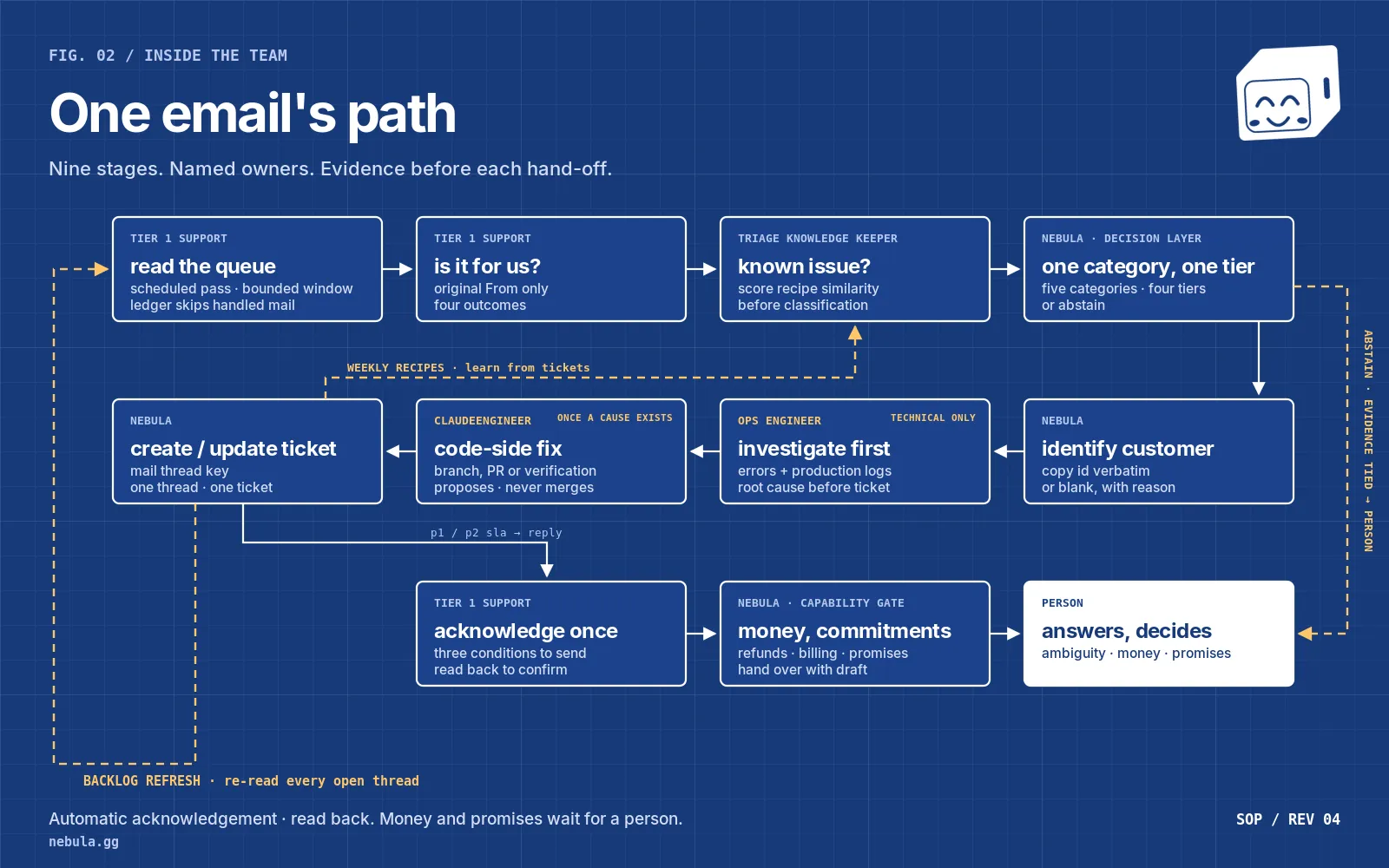
Maintaining clearly defined roles and responsibilities across specialized agents is crucial for a smooth workflow. The Nebula orchestrator seamlessly manages each incoming inquiry, guiding it step-by-step through the resolution pipeline.
- Sender Verification: Tier 1 Support validates the sender to ensure the email is intended for our team.
- Account Lookup: Retrieve essential profile and account details for the customer.
- Knowledge Base Search: Triage Knowledge Keeper evaluates the issue against past resolution logs to check for known solutions.
- Categorization & Prioritization: An automated classifier assigns a topic and priority level, instantly notifying a team member in #support for high-priority cases.
- Technical Diagnosis & Remediation: For technical issues, Ops Engineer investigates the root cause, after which ClaudeEngineer recommends a solution.
- Ticketing & Acknowledgment: System generates a single ticket per email thread and sends an automated initial response.
- Human Review Escalation: Cases requiring financial decisions, formal commitments, or those with low confidence scores are routed to a human decision-maker.
Tier 1 Support: Sender Identification & Email Processing
Tools Gmail · Supabase · Metabase
To prevent duplicate responses, a scheduled process scans unread messages within a designated timeframe while maintaining a dedicated tracking ledger.
The system’s primary task is determining legitimacy and ownership. It evaluates solely the authentic From header—ignoring any headers modified by our internal mail group—and assigns each message to one of four distinct paths:
- Customer Requests: Converted directly into support tickets.
- Sales Pitches: Bypassed entirely with a logged explanation. No auto-reply is generated, and message contents are excluded from our repository.
- Automated Member Emails: Direct replies to system-generated addresses are blocked to prevent messaging bots. If a valid address is detected within the body, we respond there; otherwise, it is assigned for manual handling.
- In-App Reports: Messages originating from no-reply addresses with reference IDs are matched to legitimate account records via Metabase.
Triage Knowledge Keeper: Leveraging Resolved Issues
Tools Live web queries · Vector search over resolution library
Our Triage Knowledge Keeper compares incoming emails against a repository of past resolutions—containing response templates, diagnostic steps, priority levels, and topic categories. If a match meets our confidence threshold, the system retrieves the standard response and classification; otherwise, it routes the ticket to human support with notes on the knowledge gap.
Automated weekly rebuilds process recent interactions, identify trends, review unmatched tickets, and add engineering fixes to keep the repository up to date and avoid repeating work.
Basing the repository on actual support cases prevents information loss from turnover and keeps our knowledge base transparent, auditable, and continuously updated.
Classification, Prioritization & Routing
Tools Supabase · Metabase (used for customer lookup); ticket records and recipe scores alone drive classification.
The classification system relies on a closed vocabulary, assigning tickets to one of four priority levels and one of five predefined categories (billing, account, bug, integration, or other).
| Priority | Response Window | Typical Triggers |
|---|---|---|
| P1 | 1 hour | System outages, billing issues blocking access, security threats, data loss |
| P2 | 4 hours | Core functionality broken, unresponsive agent, recurring trigger failures |
| P3 | 1 business day | Non-critical workflow bugs, minor billing questions, setup guidance |
| P4 | 3 business days | Feature requests, general inquiries, cosmetic defects |
Next, the system identifies the customer by querying user tables to check subscription plans, account status, billing history, and outstanding balances.
Finally, it routes the message accordingly. If an existing recipe addresses the issue, a reply is dispatched immediately. If not, the ticket is assigned to the appropriate specialized agent: Ops Engineer investigates technical issues to determine root causes, while ClaudeEngineer handles code-level resolutions once a root cause is confirmed.
Ops Engineer identifies the root cause prior to ticket creation
Tools Sentry · Metabase · GitHub
Technical issues are classified and investigated before ticket creation. Ops Engineer reproduces issues locally, checks Sentry logs, queries Metabase, and reviews GitHub code to document root causes and evidence in tickets. This ensures tickets contain actionable insights rather than generic reports.
Scope is strictly investigative and does not modify customer data or ticket priorities (e.g., P1 issues retain their 1-hour SLA). Non-technical inquiries bypass this workflow, and one investigation may resolve multiple related customer tickets.
ClaudeEngineer Formulates Solutions for Engineering Review
Tools Claude Code CLI on Opus (external, managed by engineering) · GitHub
Once Ops Engineer identifies a root cause, ClaudeEngineer handles code-level tasks like assessing defects, drafting fixes, reviewing PRs, and answering technical questions.
Engineering owns this workflow, treating code changes as standard dev tasks subject to review by on-call engineers. This gives support visibility while keeping merge control with engineering. Its overall impact on resolution time is still to be measured.
Human Support Operations & Escalation Pathways
Tools Support Dashboard
All customer-bound communication is logged in a Support Dashboard miniapp and subject to direct human review. The only exception is the initial Tier 1 Support acknowledgment, dispatched when three criteria are met and verified for accuracy.
Workflows route through three main escalation paths:
- Severity: P1 and P2 inquiries retain their SLAs
- Capability: Action-restricted requests (refunds, billing changes, binding commitments) route to authorized staff with a pre-drafted response.
- Feature Requests: Product enhancement suggestions route to #feedback for Product Feedback agent swarm review.
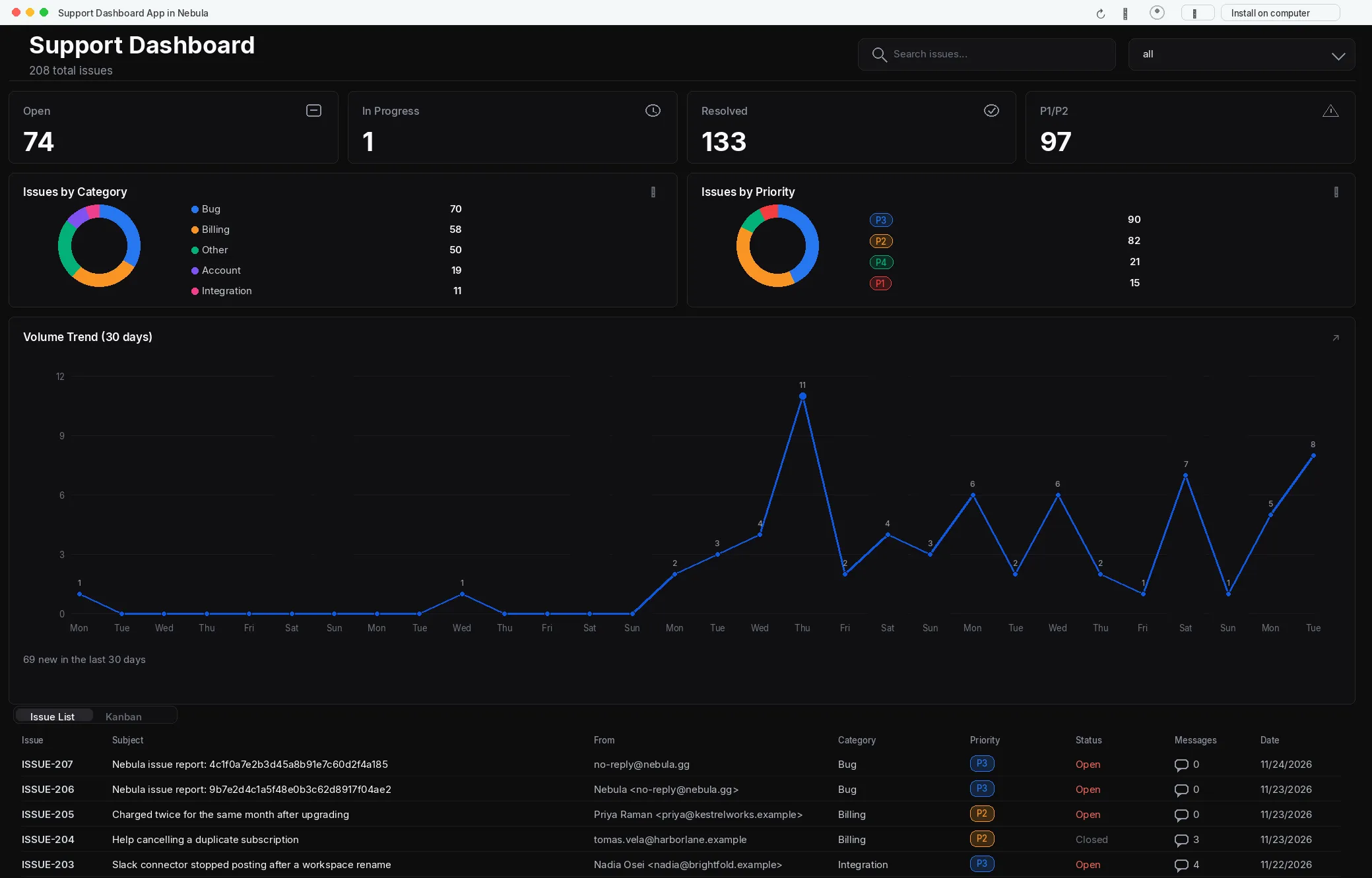
Our team uses a support dashboard with live status cards, priority metrics, a 30-day trend, and direct email thread links for immediate intervention.
Automated Background Processes
Our operations rely on five automated scheduled tasks, each configured to generate status reports on its execution:
| Scheduled Process | Report Details |
|---|---|
| Inbox Sweep | Details the timeframe evaluated, alongside skipped items and corresponding rationales |
| Backlog Synchronization | Logs processed email threads and record updates, executing routinely regardless of inbox volume |
| Weekly Recipe Audits | Summarizes pattern analyses, proposed solutions, and held-back updates |
| Classifier Metrics | Tracks categorization coverage, model alignment, and root causes for classification discrepancies |
| Feedback Dispatch | Forwards incoming feature and product suggestions to the designated feedback channel |
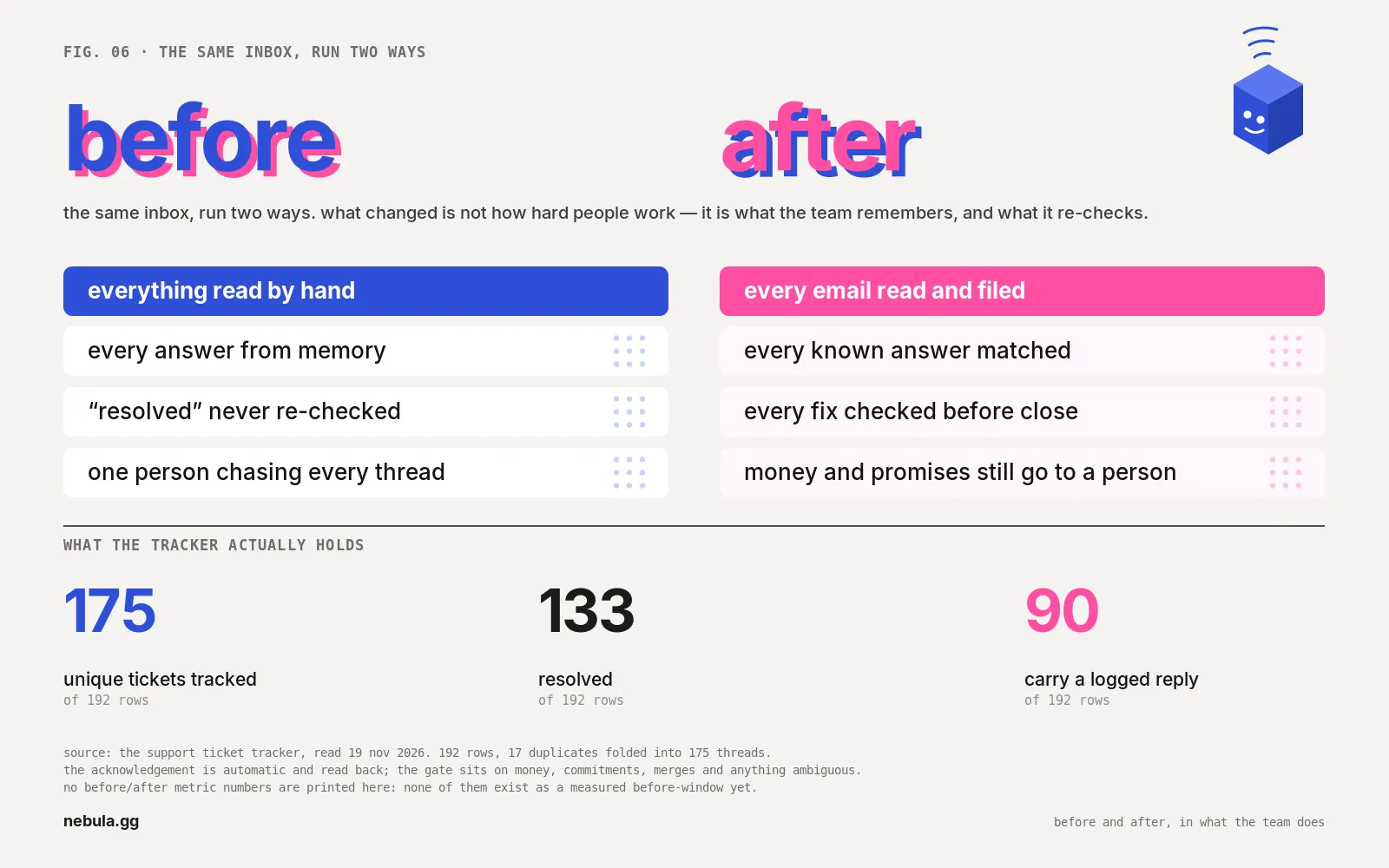
Before and after
Implementation Roadmap for Your Setup
You don’t need to roll out all five agents at once. Based on our experience, we recommend building your system step by step:
- Document your current SOPs: Map out your support workflow clearly. Define how emails are handled, how tickets get prioritized, who handles investigations and replies, and who has sign-off authority to avoid operational gaps.
- Define clear roles and toolsets: Give each agent a single focus, dedicated tools, and explicit boundaries. Decide early which tasks must remain strictly human-only.
- Build and test agents individually: Validate each agent in isolation using past tickets, manual checks, and automated reports before moving to the next one.
- Add central orchestration: Connect your tested agents through a main orchestrator. Ensure each email thread stays linked to a single ticket, smooth hand-offs occur between agents, and your team has a clear dashboard for oversight.
- Roll out automated replies gradually: Start by automating responses for a single, well-defined query type. Monitor performance closely before expanding automation, routing all other cases to human staff in the meantime.