What changed
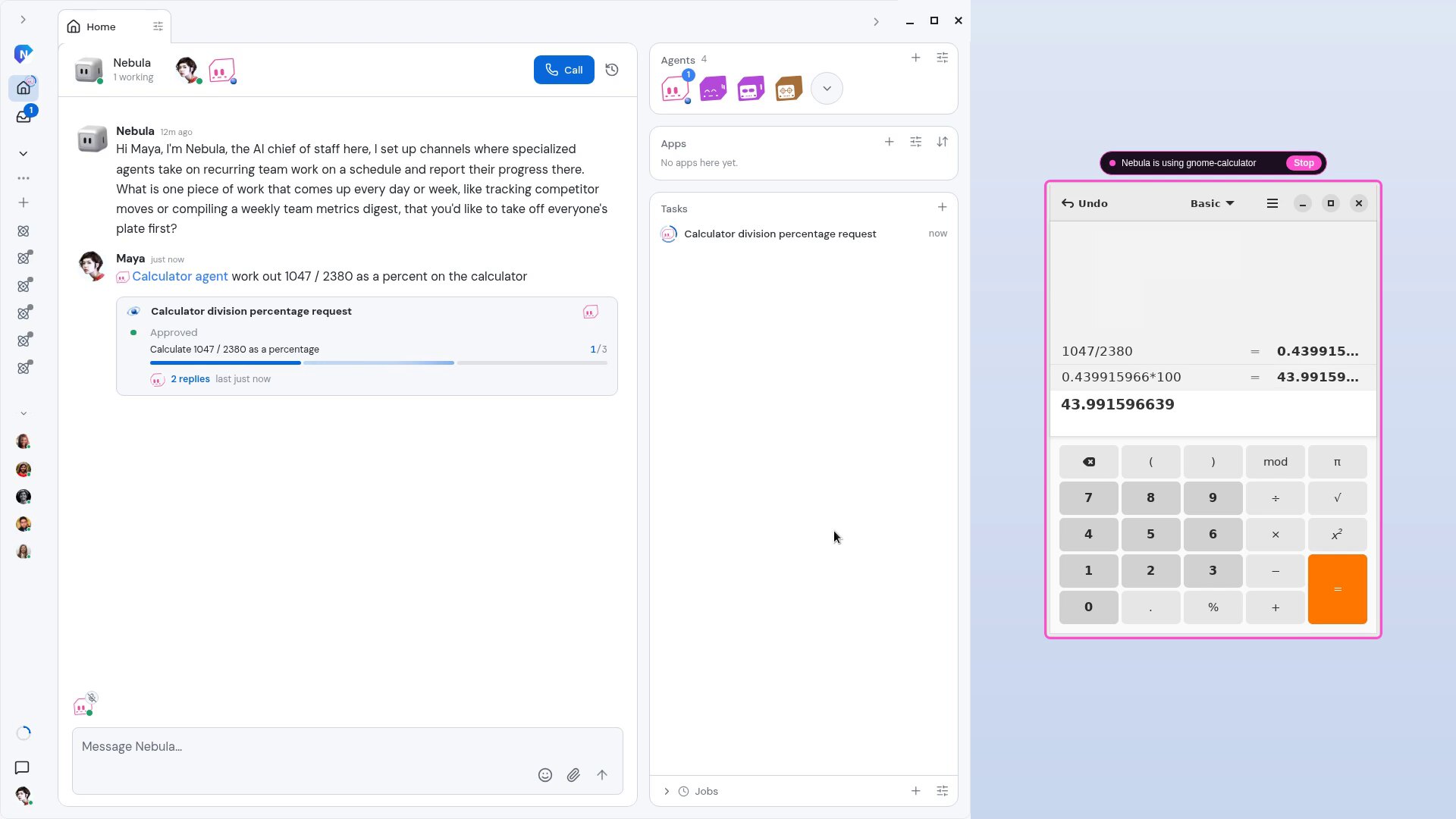
Any app open on your computer can now be an agent. Choose the app, give the agent a name, and ask it for work in Nebula like any other agent. It reads the app's window and clicks, types and uses the menus to get the job done.
While it works, a frame is drawn around the app with a "Nebula is using" label and a Stop button, so you always see what it is touching. App agents are part of the Nebula desktop app.
How it works
- Open the app you want to hand work to, for example Calculator.
- In Nebula, choose Add agent, then Apps. Turn on this computer if it isn't on yet, pick the app from the list of open apps, name the agent and create it.
- The agent lands in your Nebula DM. Mention it with what you need, for example "@Calculator agent work out 1047 / 2380 as a percent on the calculator".
- The first time it acts, Nebula asks you to approve. Choose Approve for one action or Always allow for the rest.
- The agent drives the app inside the frame and reports back on its Task card when it is done.
An app agent works only in its own app: no other apps, files or terminal. Only you can run it. The connection lasts until you take it back with Stop on the frame or under Settings, Computer use, Connected apps.
Why it matters
A lot of work lives in apps that have no API to connect. An app agent uses them the way you would, on your own computer, so you can hand off that work too and still see every step it takes.